For accounting, expense and finance software
Structured receipt data.Ready for your software.
Cheqi’s digital receipt API and webhooks deliver structured e-receipts to accounting and expense software. Receive line items, tax and totals as CHEQI JSON and supported UBL documents, including Invoice, Purchase Receipt and Credit Note. Each receipt is end-to-end encrypted for your authorized integration.
Receipt contents stay protected through Cheqi’s core routing service. Your authorized integration controls the key to its copy.
Choose your output format
{ "documentNumber": "INV-2026-001", "currency": "EUR", "totalBeforeTax": 17.81, "totalTaxAmount": 1.6, "totalAmount": 19.41, "products": [ { "name": "Croissants & coffee", "quantity": 2.0, "unitPrice": 8.905, "taxes": [ { "rate": 9.0, "type": "VAT", "amount": 1.6, "taxableAmount": 17.81 } ], "brandName": "Cheqi Bakery", "identifier": "SKU-001", "description": "Breakfast <special>", "baseQuantity": 1.0, "unitCode": "C62", "discounts": [ { "amount": 1.0, "percentage": 5.0, "label": "Loyalty & friends" } ], "subtotal": 17.81, "total": 19.41 } ], "identifiers": [ { "type": "ORDER_NUMBER", "value": "ORDER-123" } ], "issueDate": "2026-03-28T09:15:00Z", "receiptSubtotal": 17.81, "taxes": [ { "rate": 9.0, "type": "VAT", "amount": 1.6, "taxableAmount": 17.81, "label": "VAT 9%" } ], "note": "Thank you & see you soon!", "sellingParty": { "companyName": "Cheqi Bakery", "companyLegalName": "Cheqi Bakery B.V.", "taxNumber": "NL123456789B01", "phoneNumber": "+31 20 123 4567", "identifiers": [ { "id": "b0a4bb91-c6ce-4e91-a4db-c7ccb4b01455", "identifierType": "COMPANY_REGISTRATION", "registrationScheme": "KVK", "value": "12345678", "label": "Kamer van Koophandel", "countryCode": "NL", "isVerified": true, "verifiedAt": "2026-01-01T00:00:00Z" }, { "identifierType": "VAT", "value": "NL123456789B01", "label": "Btw-nummer", "countryCode": "NL", "isVerified": true } ], "address": { "street": "Damrak 1", "city": "Amsterdam", "state": "Noord-Holland", "zipCode": "1012LG", "country": "NL" } }, "barcodes": [ { "type": "QR_CODE", "data": "https://example.com/return/INV-2026-001", "label": "Return code" } ], "receiptUuid": "01234567-89ab-4def-8123-456789abcdef"}The same generated receipt as a decrypted document. CHEQI JSON is included; applicable UBL documents follow the formats your integration accepts.
No setup or per-receipt receiving fee for your software.
CHEQI JSON and accepted UBL documents, without OCR.
Automatic delivery and selected sharing use explicit authorization.
Three ways into your product
Automatic when authorized. Selected when needed.
Support recurring receipt delivery, employee expense claims and individual sharing through the same receipt infrastructure.
Authorized payment account
Personal or business card
The user pays as usual with a normal credit or debit card they linked in Cheqi.
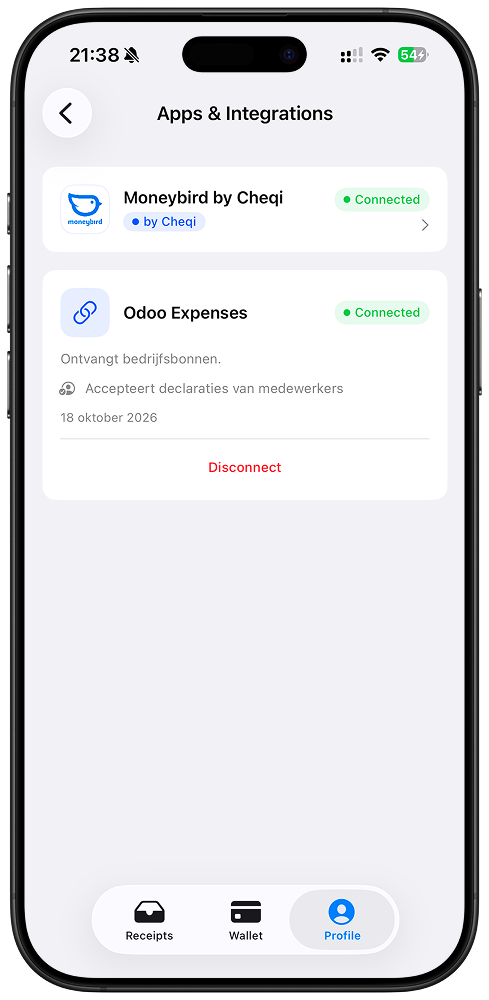
Example: users review connected destinations in Cheqi.
An encrypted copy for your product
The owner’s device prepares the recipient envelope and encrypts it for your destination. Cheqi delivers the ciphertext to your integration.
Accounting or expense tool
A recipient-encrypted receipt arrives automatically, ready for the product to process.
Delivery formats
Structured receipt formats for your integration.
The receipt owner's device builds a recipient-specific encrypted envelope. CHEQI JSON is included, together with only the applicable UBL documents your integration declares it accepts.
Each envelope document has a mediaType and serialized content. Decrypt the envelope, then parse each document according to its type.
Explore formats and deliveryNormalized receipt data for custom product workflows.
A standard invoice document for accounting and finance workflows.
A structured point-of-sale purchase document for expense workflows.
A structured correction document for refunds and returns.
From setup to first receipt
Receive receipts in your own software.
Configure your destination, request the right access and test encrypted receipt delivery in the sandbox. Your software keeps ownership of booking, review and reconciliation.
- 01
Register your integration
Create the client application in Cheqi, configure its keys and callback URLs, and choose the receipt formats it accepts.
- 02
Ask the user for access
Use OAuth to request the required permission. The user chooses whether your product may receive receipts.
- 03
Receive structured receipts
Handle the webhook or fetch from the API, decrypt the recipient envelope, and process the included documents.
Privacy is the foundation
Your integration holds the key.
Receipt contents are end-to-end encrypted. Cheqi’s core routing service delivers ciphertext without reading what was bought.
Prepared on the owner’s device
The owner’s device generates the required documents and encrypts a recipient-specific envelope for authorized third parties.
Opened in your environment
Your integration controls its private key and decrypts its own copy. Its processing and retention policies apply after receipt.
Access remains scoped
Cheqi checks current authorization for delivery. Revoking access stops future delivery; it does not erase copies a recipient already received.
Already connected
See it in a working integration.
Moneybird and Odoo Expenses show how structured receipts fit accounting and employee expense workflows.
Looking for a solution for your own team?
Receiving integrations
FreeNo charge to receive through your integration
Receiving is free for the software provider. Business customers pay the applicable Cheqi routing charges. Your integration has no setup or per-receipt receiving fee.
See pricing and conditionsConnect to Cheqi
Start receiving receipts through the API or webhooks.
Follow the integration guide to configure receipt delivery, request customer permission, and test your connection in the sandbox.